

Why WordPress Is the Best Platform for Beginners
WordPress powers over 40% of all websites globally. Because of its flexibility and ease of use, beginners consistently choose it for blogging. Moreover, WordPress offers full ownership, strong SEO performance, and thousands of customization options.
Unlike social media platforms, WordPress allows you to control your content, traffic, and monetization. Therefore, starting with WordPress gives you long-term freedom.
What You Need Before You Start
A domain name
Your domain name represents your brand online. Ideally, it should be short, memorable, and easy to spell. Although many beginners overthink this step, choosing a simple name works best.
Reliable web hosting
Hosting stores your website files and makes them accessible online. Most hosting providers offer one-click WordPress installation, which saves time.
About one to two hours of focused time
Although the process is straightforward, staying focused helps you complete everything in one day without delays.
Step 1: Choose a Hosting Provider and Install WordPress
First, select a reputable hosting provider that supports WordPress. Most modern hosts offer automated WordPress installation through their control panel.
After installation, you will receive login details for your WordPress dashboard. From there, you control everything on your site.
Step 2: Configure Essential WordPress Settings
Set your site title and tagline
Navigate to Settings → General. Here, define what your blog is about in clear language. This step helps both users and search engines understand your site.
Adjust permalink structure
Next, go to Settings → Permalinks and choose “Post name.” As a result, your URLs will look clean and SEO-friendly.
Delete default content
WordPress includes a sample post and page by default. Remove them immediately to keep your site clean.
Step 3: Choose a Fast, Clean WordPress Theme
Your theme controls how your blog looks. Therefore, choose a lightweight theme that loads quickly and looks professional.
Popular beginner-friendly themes include Astra, GeneratePress, and Kadence. These themes work well on both desktop and mobile devices.
Step 4: Install Essential Plugins Only
Although plugins add functionality, installing too many can slow your site. Instead, start with only essential plugins.
- SEO plugin – helps optimize content for search engines
- Security plugin – protects against common attacks
- Caching plugin – improves page loading speed
Once your blog grows, you can add more plugins strategically.
Step 5: Plan Your First Blog Post
Before writing, clarify your topic and audience. Ask yourself what problem your post solves. Then, outline your main points logically.
As a beginner, focus on clarity rather than perfection. Clear content always performs better than complex writing.
Step 6: Write and Format Your First Post
Create a compelling headline
Your headline should clearly state the benefit to the reader. Therefore, avoid vague titles and focus on outcomes.
Write short paragraphs
Online readers skim content. Consequently, use short paragraphs, subheadings, and lists to improve readability.
Use images wisely
Images break up text and improve engagement. However, only use relevant images that add value.

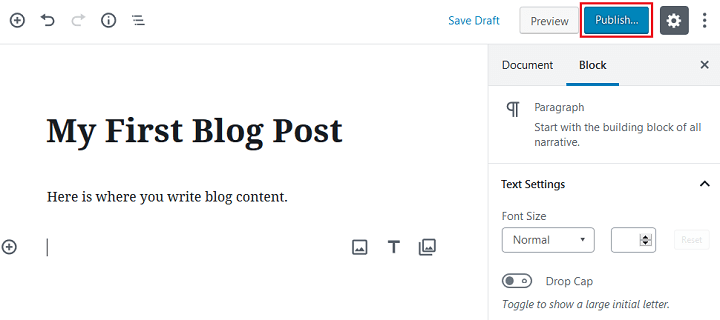
Publishing your first WordPress post using the block editor
Step 7: Optimize Your Post for SEO
SEO helps your post appear in search results. Therefore, include your focus keyphrase naturally in the title, introduction, headings, and meta description.
In addition, write a clear meta description that encourages clicks.
Step 8: Publish and Check Your Post
Before publishing, preview your post to check formatting and spelling. Then, click Publish.
Finally, view your post on both desktop and mobile to ensure everything displays correctly.
What to Do After Publishing
Publishing your first post is only the beginning. Next, focus on consistency, learning SEO basics, and improving your writing skills.
Over time, your blog can grow into a reliable traffic and income source.
Frequently Asked Questions
Can I really start a WordPress blog in one day?
Yes. With modern hosting tools and WordPress themes, most beginners can launch and publish within a few hours.
Do I need technical skills to start a WordPress blog?
No. WordPress is designed for non-technical users and uses a visual editor.
Is WordPress free?
WordPress software is free. However, you must pay for hosting and a domain name.
How much does it cost to start a WordPress blog?
Most beginners spend between $3 and $10 per month on hosting.
Can I make money from my blog later?
Yes. Blogs can earn through ads, affiliate marketing, sponsored posts, and digital products.