


Choosing to delete Facebook permanently is a significant step, especially in a time when social platforms store years of personal history. While Facebook makes account creation easy, permanent deletion requires careful attention to timing, data backups, and confirmation steps.
What Happens When You Delete Facebook Permanently
When you delete Facebook permanently, your account enters a scheduled deletion phase. Facebook typically allows a short window, usually around 30 days, during which you can cancel the request by logging back in. After this period ends, your account and associated data are queued for removal.
Once deletion is complete, your profile, photos, posts, videos, and timeline activity are removed from public view. Messages you sent to others may still remain in their inboxes, but they will no longer be linked to your account. Facebook states that backups may persist for a limited time but are not accessible to other users.
Why You Should Download Your Facebook Data First
Before you delete Facebook permanently, downloading your data ensures you keep access to content that may be important to you. This includes photos, videos, private messages, saved posts, and account activity logs.
Many users discover too late that old photos, professional contacts, or shared memories were only stored on Facebook. Downloading your data prevents permanent loss and gives you control over your digital records.
How to Download Your Facebook Data
Facebook provides a built-in tool that allows you to download a copy of your information. The process can take minutes or several hours depending on the size of your account.
Steps to Download Your Data
- Log in to your Facebook account.
- Go to Settings & Privacy and select Settings.
- Click Your Facebook Information.
- Select Download Your Information.
- Choose the data categories, date range, and file format.
- Click Request Download and wait for Facebook to notify you.
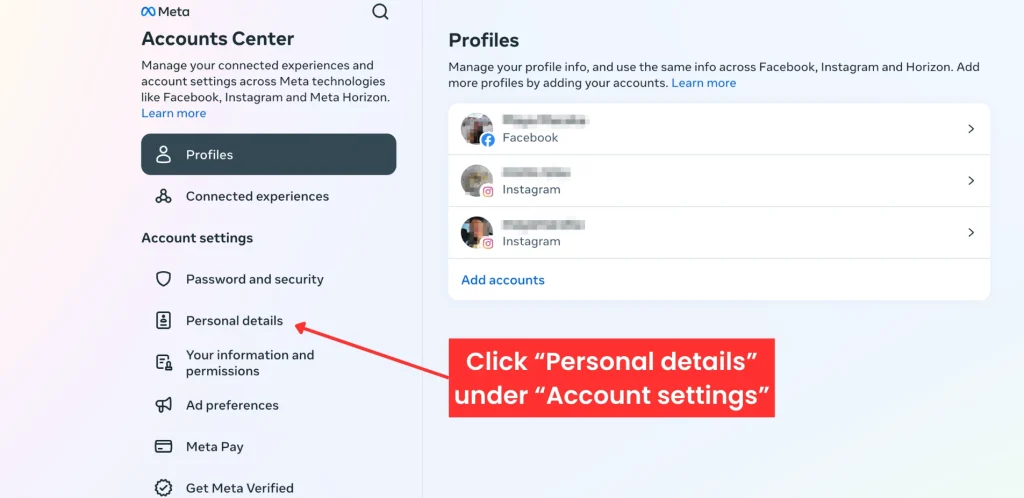
Once the file is ready, you will receive a notification allowing you to download it securely. Store the file in a safe location before proceeding with deletion.
How to Delete Facebook Permanently
After downloading your data, you can begin the permanent deletion process. This action cannot be undone once the grace period ends.
Steps to Delete Facebook Permanently
- Log in to your Facebook account.
- Open Settings & Privacy, then click Settings.
- Select Your Facebook Information.
- Click Deactivation and Deletion.
- Choose Delete Account and click Continue.
- Confirm your choice and enter your password.
After confirmation, avoid logging back in. Logging in during the grace period cancels the deletion request automatically.
Deleting Facebook on Mobile Devices
The steps to delete Facebook permanently on Android and iPhone are similar to desktop instructions. The options are found within the Facebook app settings under account ownership and control.
Ensure your app is updated to the latest version before starting, as menu layouts may differ between older versions.
Common Mistakes to Avoid
One common mistake is forgetting to download data before deletion. Another is logging back in out of habit during the grace period, which stops the deletion process. Additionally, users sometimes confuse deactivation with permanent deletion, which leaves the account recoverable.
Review each confirmation screen carefully to ensure you are selecting permanent removal.
Frequently Asked Questions
Is deleting Facebook permanent?
Yes. After the grace period ends, your account and data are permanently deleted and cannot be recovered.
How long does Facebook take to delete an account?
Facebook typically allows a short cancellation window, after which deletion may take several weeks to complete fully.
Can I reactivate my account after deletion?
You can only cancel deletion by logging in during the grace period. After that, reactivation is not possible.
Will my messages disappear after deletion?
Your messages may remain visible to recipients, but they will no longer be linked to your account.
Does deleting Facebook remove my data from Instagram?
No. Facebook and Instagram accounts must be deleted separately unless they are explicitly linked and managed together.