
OmarosaOmarosa
  • USA
  • Agriculture
  • Education
  • Finance
  • Billionaires
  • AI
  • Careers
  • Economy
  • Biography
  • Lists
No Result
View All Result
  • USA
  • Agriculture
  • Education
  • Finance
  • Billionaires
  • AI
  • Careers
  • Economy
  • Biography
  • Lists
No Result
View All Result
OmarosaOmarosa
No Result
View All Result
ADVERTISEMENT
Home How To

How to Delete a Page in Word

A complete step-by-step guide explaining every reliable way to delete a page in Microsoft Word on Windows and Mac

Clive A. by Clive A.
January 22, 2026
in How To
Reading Time: 5 mins read
A A
How to Delete a Page in Word
Share on FacebookShare on Twitter

Knowing how to delete a page in Word saves time and prevents formatting issues that can affect professional documents. The methods below cover all common scenarios, from text-filled pages to stubborn blank pages.

ADVERTISEMENT

Delete a Page in Word by Removing Text

The simplest way to delete a page in Word is by removing all the content on it. This method works best when the page contains visible text, images, or tables.

  1. Click anywhere on the page you want to remove.
  2. Press Ctrl + A (Windows) or Command + A (Mac) to select content.
  3. Press Delete or Backspace.

If no hidden formatting exists, Word automatically removes the page.
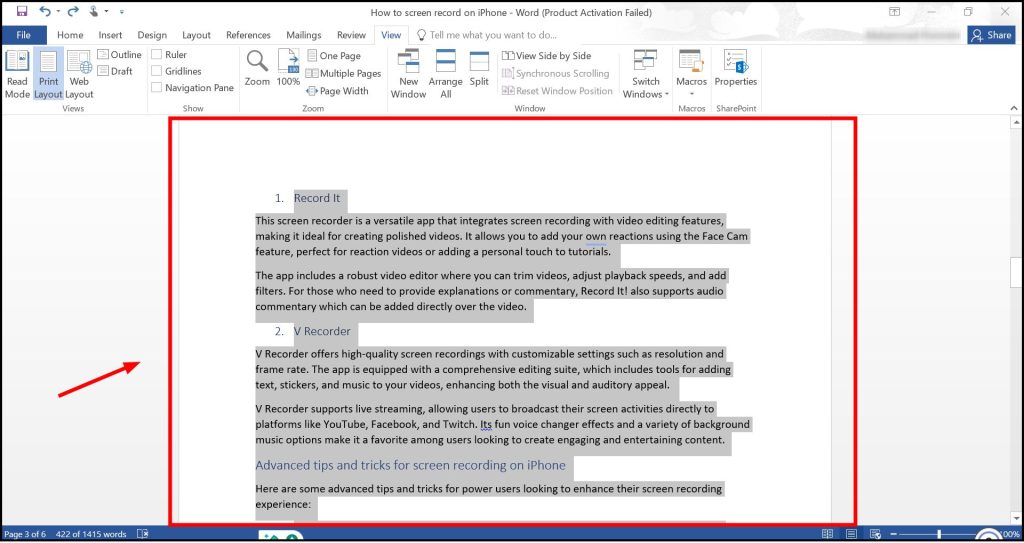
Selecting all content on a page before deletion

How to Delete a Blank Page in Word

Blank pages usually exist because of hidden paragraph marks or spacing. Turning on formatting marks helps identify the cause.

ADVERTISEMENT

Show Paragraph Marks

  1. Go to the Home tab.
  2. Click the ¶ symbol.

Once visible, delete extra paragraph marks until the blank page disappears.
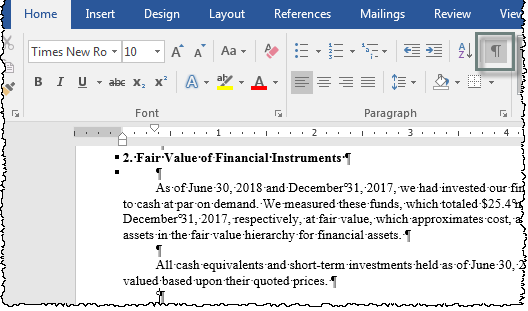
Paragraph marks reveal hidden spacing causing blank pages

Delete a Page in Word Using Page Breaks

Manual page breaks force content onto a new page. Removing them often deletes the unwanted page instantly.

  1. Enable paragraph marks.
  2. Locate the line labeled Page Break.
  3. Select it and press Delete.

This method is especially effective when an extra page appears mid-document.
ADVERTISEMENT

Deleting a manual page break in Microsoft Word

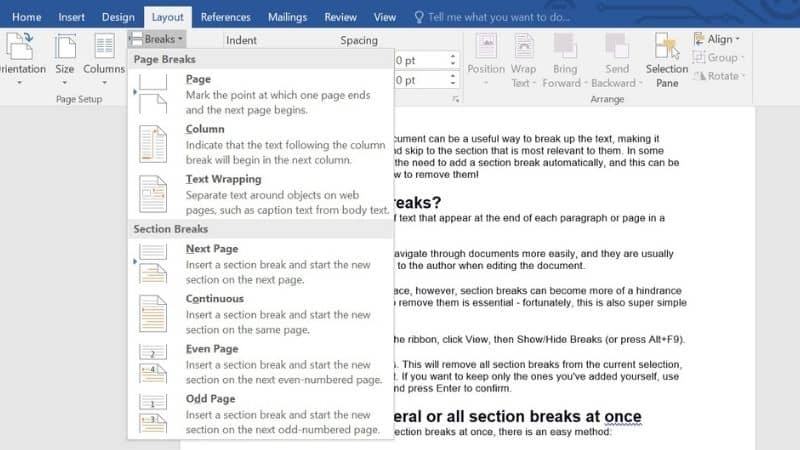
Delete a Page in Word Caused by Section Breaks

Section breaks control layout, headers, and footers. Some section types always start on a new page.

Change or Remove a Section Break

  1. Turn on paragraph marks.
  2. Find the Section Break.
  3. Delete it or change it to Continuous under Layout settings.

Be careful, as deleting section breaks may affect formatting elsewhere

Delete a Page After a Table in Word

Tables at the end of documents often cause blank pages because Word requires a paragraph after them.

To fix this:

  • Select the paragraph mark after the table.
  • Reduce its font size to 1 pt.
  • Set line spacing to exact.

This keeps the paragraph without creating a visible page.

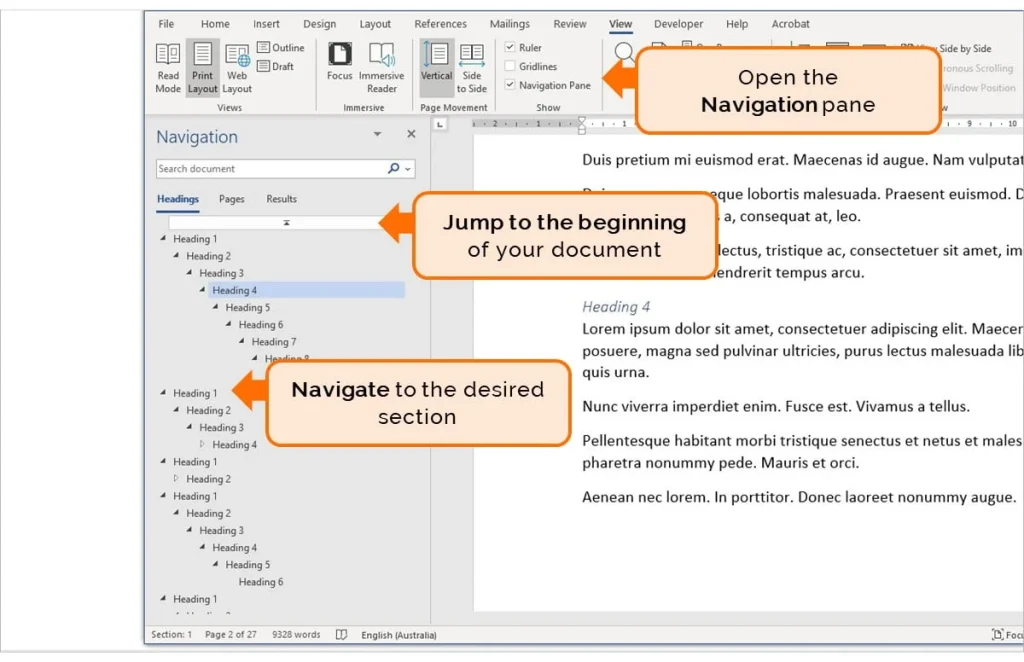
Delete a Page in Word Using Navigation Pane

The Navigation Pane helps locate pages quickly in long documents.

  1. Go to View.
  2. Enable Navigation Pane.
  3. Click Pages and select the page.
  4. Delete the content.

Using the Navigation Pane to locate pages

Delete a Page in Word on Mac

The same techniques apply on macOS, though shortcuts differ slightly. Use Command instead of Ctrl and ensure paragraph marks are visible for accurate edits.

Frequently Asked Questions

Why won’t Word let me delete a page?

Hidden formatting such as page breaks, section breaks, or paragraph marks usually causes this issue.

How do I delete a blank page at the end of a Word document?

Enable paragraph marks and delete or resize the final paragraph after tables or breaks.

Can I delete a page without affecting formatting?

Yes. Remove only the specific break or hidden content causing the page.

Does deleting a section break remove headers?

It can. Section breaks control headers and footers, so review formatting afterward.

Is there a shortcut to delete a page in Word?

No single shortcut exists, but selecting all content on the page and deleting is the fastest method.


Tags: Microsoft WordOffice Tipsproductivity
ADVERTISEMENT
Previous Post

How to Delete a Facebook Account Permanently

Next Post

How to Use AI for Work, Study, and Business

Related Posts

Uganda Youth Propose Early Specialization in Schools (2026)
How To

Uganda Youth Propose Early Specialization in Schools (2026)

21 hours ago
Africa’s youth are driving the continent’s economic transformation
How To

Rising Young Millionaires in Africa Under 35 (2026 Edition)

2 days ago
Top 10 Richest Women in East Africa in 2026
How To

Top 10 Richest Women in East Africa in 2026

3 days ago
Why Kentucky Derby 2026 Is Trending (Shocking Reasons)
How To

Why Kentucky Derby 2026 Is Trending (Shocking Reasons)

5 days ago
Modern home office setup with laptop and ultra‑wide monitors on a wooden desk for making money online from home
How To

How to Make Money Online in the USA Without Investment

1 week ago
How to File a P3 Form in Kenya: Step-by-Step Guide
How To

How to File a P3 Form in Kenya: Step-by-Step Guide

2 months ago
Load More
Next Post
AI being used at work

How to Use AI for Work, Study, and Business

ADVERTISEMENT
  • About
  • Privacy
  • Terms
  • We Are Hiring
  • DMCA
  • Contact Us
  • Advertise with us

© 2026 Omarosa Inc USA

Welcome Back!

Login to your account below

Forgotten Password?

Retrieve your password

Please enter your username or email address to reset your password.

Log In

Add New Playlist

No Result
View All Result
  • 001 FM
  • 560 Power Country
  • 560 Smooth Jazz
  • About
  • Adventist Angels Watchman 90.0 FM
  • Advertise with us
  • Athiani FM 99.2 FM
  • Bahari FM 90.4 FM
  • Baraka FM 95.5 FM
  • Base Radio
  • Bethel Radio
  • Biblia Husema 96.7 FM
  • Blackpen Radio
  • Blitz FM 254
  • Bloom Radio
  • Blue Radio
  • Cambridge Radio
  • Campus Radio Kenya
  • Capital FM 98.4
  • CGTN Radio 91.9 FM
  • Chamgei FM 90.4 FM
  • Choice Radio
  • Classic 105
  • CoELIB Radio
  • Cong’asis FM 107.7 FM
  • Contact Us
  • CountryPride FM
  • Dapstrem Radio
  • DMCA Compliance Notice
  • Doctors Explain FM
  • East Africa Radio 94.7 FM
  • East FM 106.3 FM
  • Egesa FM 103.2 FM
  • Emoo FM 104.2 FM
  • Ereto FM
  • Family Radio 103.9 FM
  • Flamingo Radio
  • Gee Radio
  • Ghetto Radio 89.5 FM
  • Gotchscape Radio
  • Gukena FM 92.2 FM
  • Haki FM
  • Hey Radio Kenya
  • Hip-Hop Daily
  • Hits Radio Kenya
  • Homeboyz Radio
  • HoodRadio Kenya
  • Hope FM
  • Hot 96 FM 96.0 FM
  • Iced Radio
  • Iftiin FM 101.9 FM
  • Images: All Passports in The World
  • Inooro FM 98.9 FM
  • Islando Radio Ke
  • Jesus is Lord Radio 105.3 FM
  • Kalya FM 106.5 FM
  • Kameme FM
  • Kass FM 89.1 FM
  • KBC Coro FM
  • KBC English Service 95.6 FM
  • KBC Mayienga FM 93.5
  • KBC Pwani FM 103.1 FM
  • KBC Radio Taifa 92.9 FM
  • Kigooco FM 98.6 FM
  • Kiss 100 100.3 FM
  • Kwitu FM
  • LionafriQ Radio
  • LIVECITY RADIO Ke
  • Lulu FM 91.0 FM
  • Makinika Radio
  • Masihi Redio Afrika
  • Mayian FM
  • MBA Radio
  • Mbaitu FM 92.5 FM
  • Meru Radio 88.3 FM
  • Milele FM 104.8 FM
  • Mo Radio 88.2 FM
  • Mt Zion Radio KE
  • Mugambo Wa Mugikuyu FM
  • Mulembe FM 97.9 FM
  • Musyi FM 102.2 FM
  • Muuga FM 94.2 FM
  • Mwaki FM
  • Mwangaza Wa Neno Fm
  • Mwangaza Wa Neno FM 89.3 FM
  • Mwatu FM 93.1
  • Nation FM 96.3 FM
  • North Rift Radio
  • NRG Radio 97.1 FM
  • Omoka Radio
  • Online Radio from Kenya – Listen to Kenyan Radio Stations Free
  • Pearl Radio Ke 96.9 FM
  • PlanetFive
  • Portfolio Diversification Tools Guide
  • Power Kenya FM
  • Praise Radio Kenya
  • Privacy Policy for OmarosaOmarosa.com
  • Radio 254
  • Radio 316
  • Radio 47
  • Radio Citizen
  • Radio Daima
  • Radio Halisi
  • Radio Jambo
  • Radio Kaya 93.1 FM
  • Radio Maisha 102.7 FM
  • Radio Maria 107.3 FM
  • Radio Midnimo 90.2 FM
  • Radio Ngamia
  • Radio Ngoma 90.7 FM
  • Radio Rahma 91.5 FM
  • Radio Safari 87.9 FM
  • Radio Safina 90.7 FM
  • Radio Salaam FM 90.7 FM
  • Radio Shahidi 91.7 FM
  • Radio Simba 91.3 FM
  • Radio Waumini 88.3 FM
  • Radio44 Kenya
  • Rafiki-Farm Main Altar
  • Ramogi FM 107.1 FM
  • Relax 103 FM
  • Riri Radio 93.7 FM
  • Sauti ya Pwani FM 94.2 FM
  • Skilled Migration Resource Library: Guides, Tools & Visa Pathways
  • Smash Jam Radio
  • Smooth FM 105.5 FM
  • SoftRadio Station
  • Sound Asia FM 88.0 FM
  • Spice FM 94.4 FM
  • Spring of Worship
  • Star FM 105.9 FM
  • Terms of Use for OmarosaOmarosa.com
  • Tonzi Radio
  • Trace FM 95.3 FM
  • Truth FM 90.7 FM
  • Uiguithanio FM
  • Upward Radio
  • Utheri Radio
  • Varch Radio
  • Vuuka FM 100.4 FM
  • We Are Hiring
  • Your Hub for Insights, Inspiration, and Everything in Between

© 2026 Omarosa Inc USA