


Canceling your Hulu subscription in 2026 is straightforward when you know the correct path, whether you use a direct Hulu account or a bundled/third-party billing method. Hulu allows cancellation at any time, with access continuing until the end of your current paid period—no immediate cutoff unless special circumstances apply.
Follow the method matching your signup process to avoid common pitfalls like hidden menus or redirected pages.
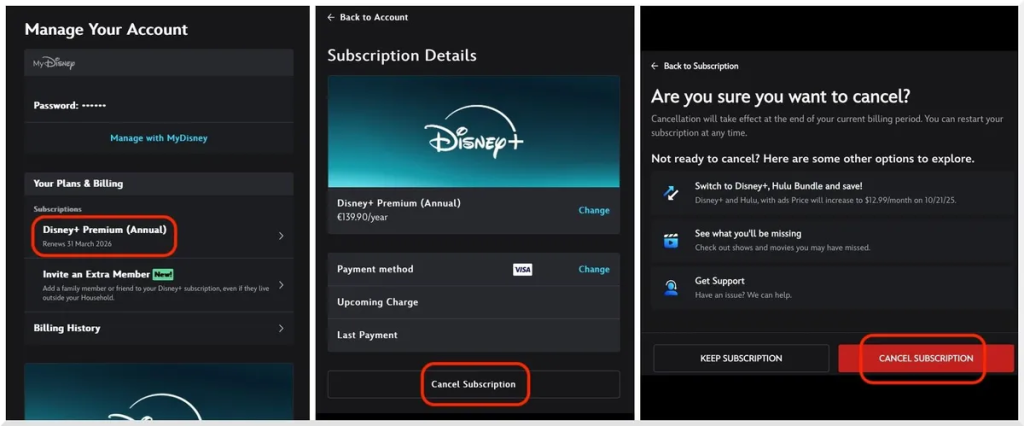
Hulu Account dashboard where the “Cancel Your Subscription” button appears after logging in. (Credit: Hulu Help Center)
Cancel Hulu Directly on Hulu.com (Most Common Method)
The primary and simplest way to cancel Hulu applies if you signed up directly through hulu.com or the Hulu app using credit/debit card, PayPal, or similar.
- Visit hulu.com in a web browser on computer or mobile (desktop preferred for visibility).
- Log in using your email and password associated with the account.
- Click your profile icon in the top-right corner, then select Account.
- Scroll to the Your Subscription section.
- Click Cancel Your Subscription (often near the bottom or under Manage Plan).
- Follow on-screen prompts: Hulu may offer pause options, surveys, or retention offers—select Continue to Cancel until confirmation.
- Verify receipt of a confirmation email stating your subscription ends at the current billing period’s close.
After cancellation, you retain full access until the billing cycle expires—no prorated refunds apply in most cases.
Cancel Hulu Through the Disney+ Bundle
If your Hulu comes via the Disney+ with Hulu (and ESPN+) bundle, manage cancellation through Disney+ settings as it controls the combined subscription.
- Go to disneyplus.com or open the Disney+ app and log in.
- Navigate to your profile → Account → Billing Details or Subscriptions.
- Select the bundle plan and choose the cancel or manage option.
- Confirm cancellation—note this ends access to Hulu, Disney+, and ESPN+ content simultaneously at period end.
Direct Hulu cancellation no longer applies in bundled scenarios per 2026 subscriber agreement updates.
Cancel Hulu on iPhone, iPad (Subscribed via Apple)
For subscriptions billed through Apple ID (App Store), cancel via iOS settings.
- Open Settings on your iPhone/iPad.
- Tap your name at the top, then Subscriptions.
- Select Hulu from the list.
- Tap Cancel Subscription and confirm.
Apple processes the request; access ends at billing cycle close. Refunds, if eligible (rare), go through Apple Support.
Cancel Hulu on Android (Google Play Billing)
Android users subscribed via Google Play follow these steps.
- Open the Google Play Store app.
- Tap your profile icon → Payments & subscriptions → Subscriptions.
- Choose Hulu.
- Tap Cancel subscription and follow prompts.
Confirmation appears in email; service continues until period ends.
Cancel Hulu Through Other Third-Party Providers
If billed via Roku, Amazon, Spotify, or cable providers (e.g., Spectrum), cancel through that platform:
- Roku: Settings → Subscriptions → Manage → Cancel Hulu.
- Amazon: Amazon.com → Your Account → Memberships & Subscriptions → Cancel Hulu.
- Cable/ISP: Contact provider support or app portal to remove Hulu add-on.
Always verify the billing source in your Hulu Account page under Payment Information first.
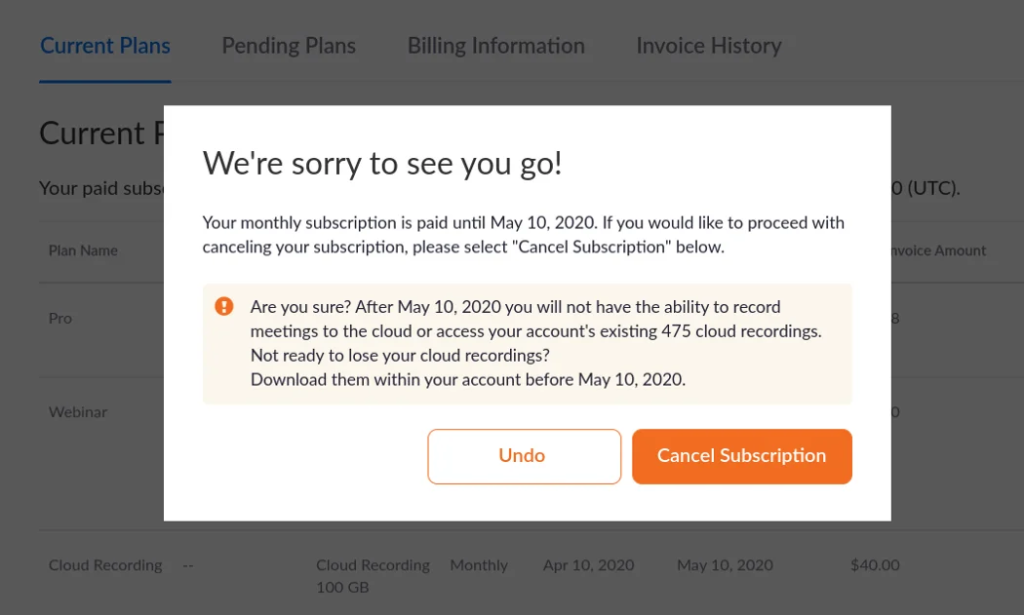
Example of Hulu’s cancellation confirmation message showing end-of-period access. (Credit: Hulu)
Hulu Cancellation Policy & Refunds in 2026
Hulu’s policy states you can cancel anytime, effective at the end of the current billing period. No prorated refunds exist for partial months—access continues until paid time expires.
Exceptions include:
- Free trial conversions: Contact support quickly for possible courtesy refund.
- Billing errors/outages: Request review via help form or chat.
- Third-party billing: Refunds handled by Apple, Google, etc., per their terms.
Check the latest Subscriber Agreement for updates.
Common Issues & Troubleshooting
If the cancel button doesn’t appear:
- Use desktop browser (mobile app often redirects to web).
- Clear cache/cookies or try incognito mode.
- Confirm you’re the primary account holder.
- Contact Hulu support via chat (Account page) or help center form.
Post-cancellation, monitor email and bank statements for confirmation—no further charges should occur.
Alternatives to Canceling: Pausing Your Subscription
Instead of full cancellation, Hulu offers a pause option (up to 12 weeks) via Account → Pause Your Subscription. Ideal for temporary breaks without losing profiles or watch history.
Frequently Asked Questions
Can I cancel Hulu immediately and stop access right away?
No—cancellation takes effect at the end of your current billing period. You keep full access until then, with no mid-cycle termination option in standard cases.
Will I get a refund if I cancel Hulu mid-month?
Hulu does not provide prorated refunds for partial months. You pay upfront and retain service until the period ends.
How do I cancel Hulu if I subscribed through Disney+ bundle?
Manage and cancel the bundle directly in your Disney+ account settings—Hulu cannot be canceled separately in bundled plans.
What happens to my Hulu profile and watch history after canceling?
Profiles, watch history, and preferences remain saved for up to 30 days. Resubscribing within that window restores everything; longer gaps may result in loss.
Can I cancel Hulu on the mobile app?
The Hulu app redirects to the website for cancellation. Use a mobile browser to access hulu.com/account for the full process.
Who do I contact if I can’t find the cancel option?
Use Hulu’s live chat on the Account page or submit a help ticket. Provide account email and describe the issue for fastest resolution.
Mastering how to cancel Hulu in 2026 empowers you to manage streaming costs effectively. Whether switching services, pausing, or ending entirely, follow the correct channel based on your billing method to ensure a smooth transition without surprise charges. Always save confirmation emails for records.
Word count: 1,712