

ADVERTISEMENT
OmarosaOmarosa
  • USA
  • Agriculture
  • Education
  • Finance
  • Research
  • Billionaires
  • AI
  • Careers
  • Economy
  • Biography
  • Lists
OmarosaOmarosa
No Result
View All Result
OmarosaOmarosa
No Result
View All Result
Home How To

How to Read an Aviation Routine Weather Report (METAR)

Clive A. by Clive A.
November 29, 2024
in How To
Reading Time: 9 mins read
A A
Weather Report (METAR)

Weather Report (METAR)

Share on FacebookShare on Twitter

Learn how to read a METAR report for essential aviation weather data. Decode wind, visibility, clouds, and more with this comprehensive step-by-step guide.

ADVERTISEMENT

Introduction

Aviation Routine Weather Reports, known as METARs, provide vital weather information for pilots and aviation enthusiasts. At first glance, these reports may seem like a confusing string of letters and numbers, but they contain critical data about flying conditions, including wind, visibility, clouds, and more. Pilots rely on METARs to assess current weather and make informed decisions about flight safety.

This guide will demystify METAR reports, showing you how to decode their format and interpret the information effectively. Whether you’re a student pilot, weather enthusiast, or professional aviator, understanding METARs is an essential skill. From report type and wind conditions to cloud coverage and additional remarks, we’ll break down each section of a METAR and explain how to read it like a pro.


Part 1: Finding the Report Type and Origin

Step 1: Obtain a METAR Report

METAR reports are available online through aviation weather services or directly from airport aviation centers. For example, the U.S. Aviation Weather Center provides METARs for various locations, which are updated hourly. Simply choose a location and time frame to access current or past reports.


Step 2: Identify the Report Type

The first code in the report specifies the type of report:

ADVERTISEMENT
  • METAR: Routine hourly weather report.
  • SPECI: Special, unscheduled report issued for significant weather events like thunderstorms or low visibility.
  • TAF: Terminal Aerodrome Forecast, used for predicting weather over a broader timeframe.

Step 3: Locate the Station Identifier

The station identifier follows the report type. It consists of a four-letter code assigned by the World Meteorological Organization (WMO):

  • KAFF: U.S. Air Force Academy in Colorado (K = U.S.).
  • EGLL: London Heathrow Airport (E = UK).
  • RJAA: Tokyo Narita Airport (R = Japan).

Step 4: Decode the Date and Time

The six-digit code after the station identifier shows the date and time in Zulu time (UTC):

  • Example: 212355Z
    • 21: Day of the month.
    • 2355: Time in Zulu (23:55 UTC).

This format excludes the month and year, so always check the context.


Step 5: Check for Modifiers

Modifiers provide additional information about the report’s origin:

ADVERTISEMENT
  • AUTO: Generated by an automated weather station.
  • COR: A corrected report by a human observer.

Part 2: Determining Wind and Visibility Factors

Step 1: Interpret Wind Direction and Speed

The next section describes wind conditions:

  • Example: VRB05KT
    • VRB: Variable wind direction.
    • 05KT: Wind speed of 5 knots.

Other codes:

  • 180V260: Wind direction varies between 180° and 260°.
  • G26KT: Gusts of 26 knots.

Step 2: Evaluate Visibility

Visibility is listed as a numerical value followed by units:

  • 15SM: Visibility of 15 statute miles (used in the U.S.).
  • 1400: Visibility of 1,400 meters (used internationally).

Fractions may also appear (e.g., 1 1/2SM for 1.5 miles).


Step 3: Assess Runway Visibility

Runway-specific visibility begins with R:

  • Example: R36L/2400FT
    • R36L: Runway 36 Left.
    • 2400FT: Visibility of 2,400 feet.

Part 3: Obtaining Weather and Cloud Information

Step 1: Decode Present Weather Conditions

Weather conditions are represented by two-letter abbreviations, which may include intensity and descriptors. Examples include:

  • -SHRA: Light rain showers.
  • +TSRA: Heavy thunderstorms with rain.
  • FG: Fog.
  • HZ: Haze.
  • VC: “In the vicinity” (near the station).

Step 2: Analyze Cloud Coverage

Sky conditions start with three-letter codes followed by altitude:

  • SKC: Sky clear (manual reports).
  • CLR: Clear below 12,000 feet (automated reports).
  • FEW040: Few clouds at 4,000 feet.
  • BKN220: Broken clouds at 22,000 feet.
  • OVC: Overcast (total sky coverage).

Step 3: Check Cloud Height

The altitude of cloud bases is given in hundreds of feet:

  • Example: SCT060: Scattered clouds at 6,000 feet.
  • BKN220TCU: Towering cumulus clouds at 22,000 feet.
  • VV003: Vertical visibility up to 300 feet.

Step 4: Read Temperature and Dew Point

Temperature and dew point are separated by a slash:

  • Example: 15/M01
    • 15: Temperature is 15°C.
    • M01: Dew point is -1°C.

Step 5: Review the Altimeter Setting

Altimeter settings start with A for “altimeter,” followed by four digits:

  • Example: A2957
    • Atmospheric pressure of 29.57 inches of Mercury (Hg).
  • International reports may use Q1030 for 1,030 hectopascals.

Step 6: Look for Additional Remarks

Remarks provide extra details, often using unique codes:

  • ACSL DSNT SE-S: Altocumulus standing lenticular clouds in the distant southeast.
  • SLP960: Sea level pressure of 996.0 millibars.
  • 60001 55000: Automated maintenance codes.

Practice Example: Decoding a METAR Report

Sample METAR:
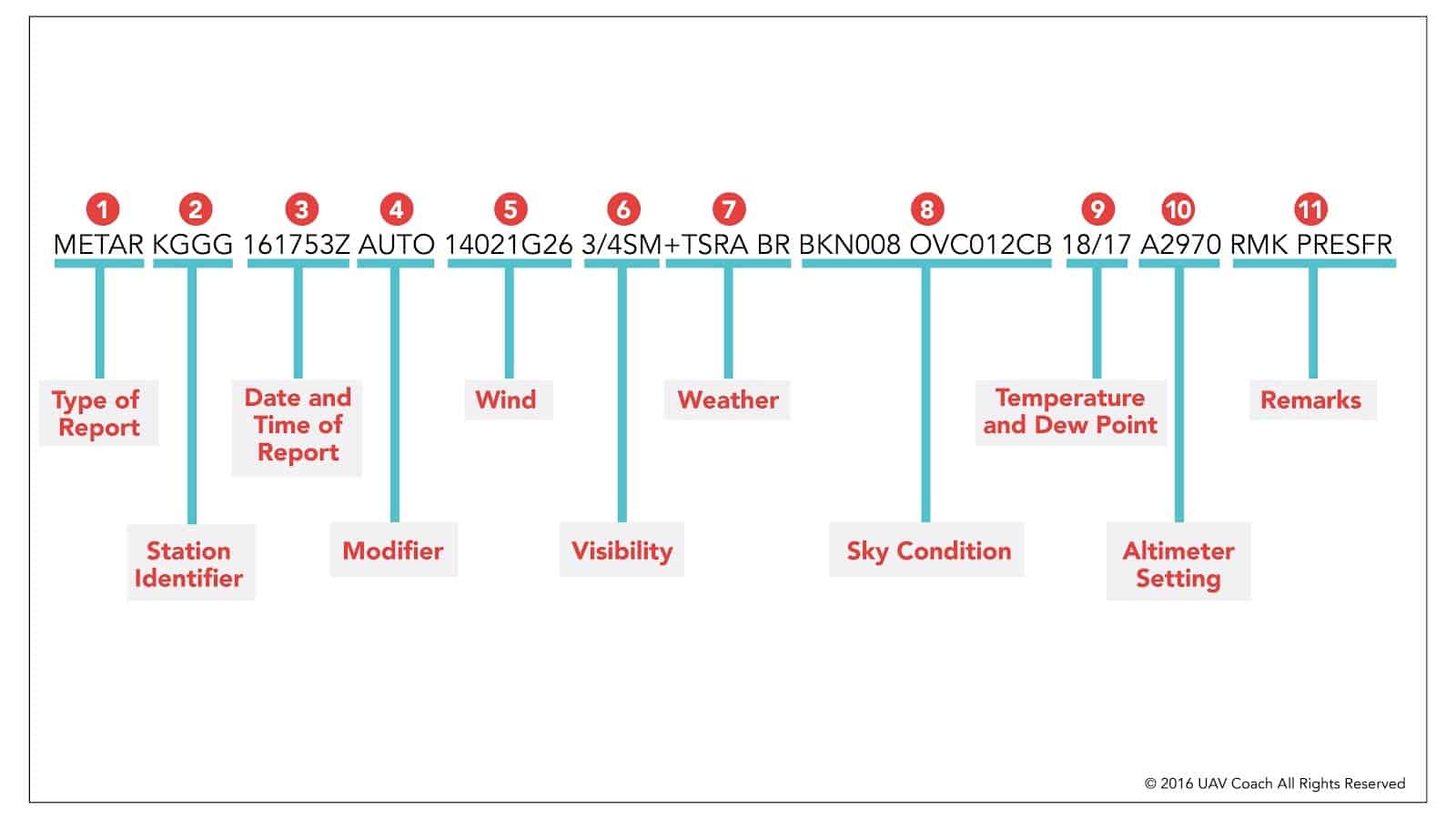
METAR KAFF 212355Z AUTO 18015KT 10SM -SHRA BKN060 BKN100 OVC220 15/M01 A2957 RMK AO2

Decoded:

  • METAR: Routine report.
  • KAFF: U.S. Air Force Academy station.
  • 212355Z: Issued on the 21st at 23:55 Zulu time.
  • AUTO: Generated automatically.
  • 18015KT: Winds from 180° at 15 knots.
  • 10SM: Visibility of 10 statute miles.
  • -SHRA: Light rain showers.
  • BKN060: Broken clouds at 6,000 feet.
  • BKN100: Broken clouds at 10,000 feet.
  • OVC220: Overcast clouds at 22,000 feet.
  • 15/M01: Temperature is 15°C; dew point is -1°C.
  • A2957: Altimeter set to 29.57 inches of Mercury.
  • RMK AO2: Automated observation with a precipitation sensor.

Tips for Decoding METARs

  1. Use Charts for Reference:
    Charts of abbreviations simplify decoding (e.g., NOAA METAR Guide).
  2. Practice Regularly:
    Familiarity comes with practice. Start with basic METARs and work up to more complex ones.
  3. Understand Context:
    Cross-reference METARs with other weather reports (like TAFs) for a comprehensive view.

Conclusion

Reading METAR reports is an essential skill for aviators, providing crucial weather information for flight planning and safety. By breaking down each section of the report—type, wind, visibility, clouds, and remarks—you can confidently interpret even the most complex METARs. Practice regularly, and you’ll soon decode aviation weather reports with ease, ensuring safer skies for every flight.


ADVERTISEMENT
Previous Post

How to Understand US Military Aircraft Designations

Next Post

How to Get Your FCC General Radiotelephone Operator License at Home

Related Posts

How to understand your rights as a tenant in the USA - illustrated guide showing evictions, deposits, and repairs with legal symbols and American flag
How To

How to Understand Your Rights as a Tenant in the USA (Evictions, Deposits, Repairs)

by Clive A.
1 month ago
0

Knowing how to understand your rights as a tenant in the USA is essential for protecting yourself from unfair practices...

Read moreDetails
shipping agents in Kenya
How To

How to Identify Shipping Agents in Kenya

by Clive A.
1 month ago
0

Working with the right shipping agents in Kenya is one of the most important decisions an importer or exporter can...

Read moreDetails
How to Clear Goods at Mombasa Port featured image showing shipping containers, cargo cranes, and the Port of Mombasa with a customs clearance guide headline.
How To

How to Clear Goods at Mombasa Port: Complete Guide 2026

by Clive A.
1 month ago
0

The Port of Mombasa is the busiest port in East Africa, handling millions of tonnes of cargo every year. Learning...

Read moreDetails
how Kenyans can import electronics from China successfully
How To

How Kenyans Can Import Electronics from China Successfully

by Clive A.
1 month ago
0

Many Kenyans want to know how Kenyans can import electronics from China successfully to start or grow a profitable business....

Read moreDetails
African healthcare professionals reviewing medical data in a hospital with medical equipment and text “Start a Healthcare Business in Kenya”
How To

Start a Healthcare Business in Kenya: Ultimate Guide 2026

by Clive A.
2 months ago
0

Start a healthcare business in Kenya by first understanding the legal, financial, and operational requirements needed to succeed. Kenya’s healthcare...

Read moreDetails
Featured image titled “How Bloggers Build Passive Income in 2026” with blogging and income growth graphics.
How To

How Bloggers Build Passive Income in 2026

by Clive A.
3 months ago
0

Did you know that some bloggers earn over $10,000 per month on autopilot? The secret to **how bloggers build passive...

Read moreDetails
Load More
Next Post
FCC General Radiotelephone Operator License at Home

How to Get Your FCC General Radiotelephone Operator License at Home

ADVERTISEMENT
  • About
  • Privacy
  • Terms
  • We Are Hiring
  • DMCA
  • Contact Us
  • Advertise with us

© 2026 Omarosa Inc USA

Welcome Back!

Login to your account below

Forgotten Password?

Retrieve your password

Please enter your username or email address to reset your password.

Log In

Add New Playlist

No Result
View All Result
  • 001 FM
  • 560 Power Country
  • 560 Smooth Jazz
  • About
  • Adventist Angels Watchman 90.0 FM
  • Advertise with us
  • Athiani FM 99.2 FM
  • Bahari FM 90.4 FM
  • Baraka FM 95.5 FM
  • Base Radio
  • Bethel Radio
  • Biblia Husema 96.7 FM
  • Blackpen Radio
  • Blitz FM 254
  • Bloom Radio
  • Blue Radio
  • Cambridge Radio
  • Campus Radio Kenya
  • Capital FM 98.4
  • CGTN Radio 91.9 FM
  • Chamgei FM 90.4 FM
  • Choice Radio
  • Classic 105
  • CoELIB Radio
  • Cong’asis FM 107.7 FM
  • Contact Us
  • CountryPride FM
  • Dapstrem Radio
  • DMCA Compliance Notice
  • Doctors Explain FM
  • East Africa Radio 94.7 FM
  • East FM 106.3 FM
  • Egesa FM 103.2 FM
  • Emoo FM 104.2 FM
  • Ereto FM
  • Family Radio 103.9 FM
  • Flamingo Radio
  • Gee Radio
  • Ghetto Radio 89.5 FM
  • Gotchscape Radio
  • Gukena FM 92.2 FM
  • Haki FM
  • Hey Radio Kenya
  • Hip-Hop Daily
  • Hits Radio Kenya
  • Homeboyz Radio
  • HoodRadio Kenya
  • Hope FM
  • Hot 96 FM 96.0 FM
  • Iced Radio
  • Iftiin FM 101.9 FM
  • Images: All Passports in The World
  • Inooro FM 98.9 FM
  • Islando Radio Ke
  • Jesus is Lord Radio 105.3 FM
  • Kalya FM 106.5 FM
  • Kameme FM
  • Kass FM 89.1 FM
  • KBC Coro FM
  • KBC English Service 95.6 FM
  • KBC Mayienga FM 93.5
  • KBC Pwani FM 103.1 FM
  • KBC Radio Taifa 92.9 FM
  • Kigooco FM 98.6 FM
  • Kiss 100 100.3 FM
  • Kwitu FM
  • LionafriQ Radio
  • LIVECITY RADIO Ke
  • Lulu FM 91.0 FM
  • Makinika Radio
  • Masihi Redio Afrika
  • Mayian FM
  • MBA Radio
  • Mbaitu FM 92.5 FM
  • Meru Radio 88.3 FM
  • Milele FM 104.8 FM
  • Mo Radio 88.2 FM
  • Mt Zion Radio KE
  • Mugambo Wa Mugikuyu FM
  • Mulembe FM 97.9 FM
  • Musyi FM 102.2 FM
  • Muuga FM 94.2 FM
  • Mwaki FM
  • Mwangaza Wa Neno Fm
  • Mwangaza Wa Neno FM 89.3 FM
  • Mwatu FM 93.1
  • Nation FM 96.3 FM
  • North Rift Radio
  • NRG Radio 97.1 FM
  • Omoka Radio
  • Online Radio from Kenya – Listen to Kenyan Radio Stations Free
  • Pearl Radio Ke 96.9 FM
  • PlanetFive
  • Portfolio Diversification Tools Guide
  • Power Kenya FM
  • Praise Radio Kenya
  • Privacy Policy for OmarosaOmarosa.com
  • Radio 254
  • Radio 316
  • Radio 47
  • Radio Citizen
  • Radio Daima
  • Radio Halisi
  • Radio Jambo
  • Radio Kaya 93.1 FM
  • Radio Maisha 102.7 FM
  • Radio Maria 107.3 FM
  • Radio Midnimo 90.2 FM
  • Radio Ngamia
  • Radio Ngoma 90.7 FM
  • Radio Rahma 91.5 FM
  • Radio Safari 87.9 FM
  • Radio Safina 90.7 FM
  • Radio Salaam FM 90.7 FM
  • Radio Shahidi 91.7 FM
  • Radio Simba 91.3 FM
  • Radio Waumini 88.3 FM
  • Radio44 Kenya
  • Rafiki-Farm Main Altar
  • Ramogi FM 107.1 FM
  • Relax 103 FM
  • Riri Radio 93.7 FM
  • Sauti ya Pwani FM 94.2 FM
  • Skilled Migration Resource Library: Guides, Tools & Visa Pathways
  • Smash Jam Radio
  • Smooth FM 105.5 FM
  • SoftRadio Station
  • Sound Asia FM 88.0 FM
  • Spice FM 94.4 FM
  • Spring of Worship
  • Star FM 105.9 FM
  • Terms of Use for OmarosaOmarosa.com
  • Tonzi Radio
  • Trace FM 95.3 FM
  • Truth FM 90.7 FM
  • Uiguithanio FM
  • Upward Radio
  • Utheri Radio
  • Varch Radio
  • Vuuka FM 100.4 FM
  • We Are Hiring
  • Your Hub for Insights, Inspiration, and Everything in Between

© 2026 Omarosa Inc USA